A good LinkedIn connection request is a short note with three things in it: the person’s first name, one specific reason you are reaching out, and a small ask, which is usually just to connect. Stay well under the limit, which is 200 characters on a free account and 300 with Premium, and save any pitch for much later, if ever.
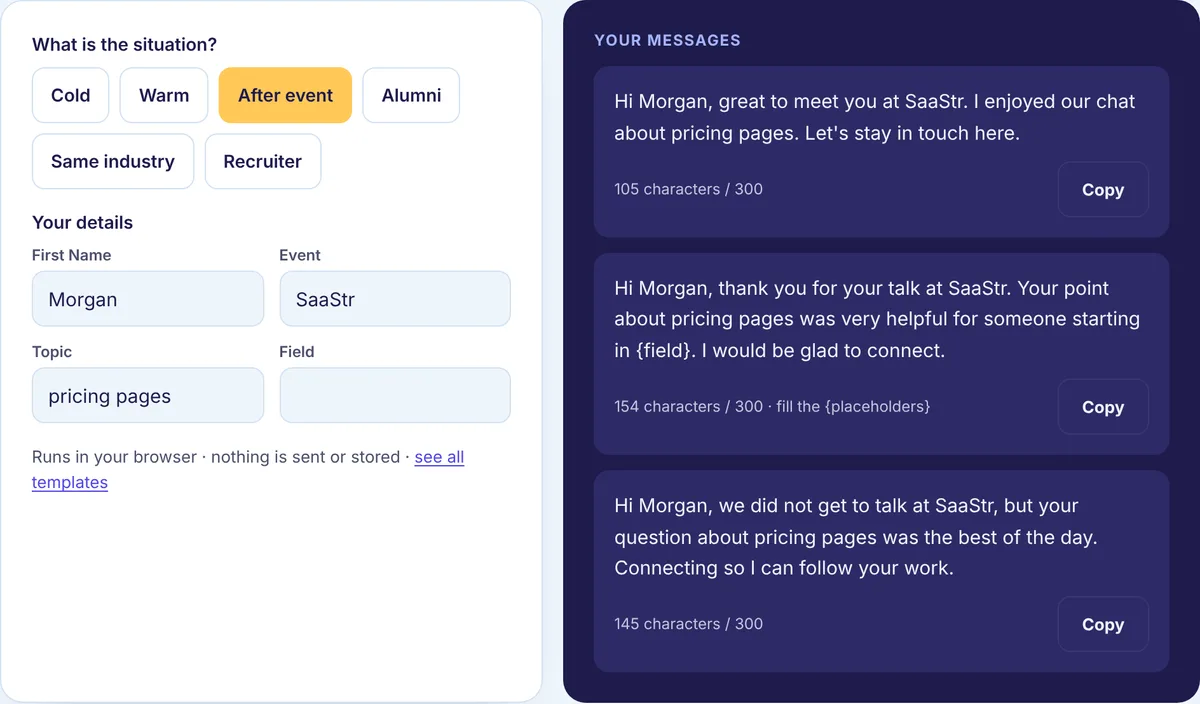
The free Connection Message Generator fills ready notes with your details and counts the characters as you edit. If you would rather write your own, the walkthrough below builds one note from a bad first draft to a good one, measuring it at each step.
The person we are writing to
Here is the setup for our example. You work in content operations at a software company. For a few months you have been reading a newsletter on B2B search marketing by someone we will call Lee. One recent issue argued for refreshing old posts instead of writing new ones, and you actually changed your team’s plan because of it. You have never spoken to Lee. You want to connect.
That is a common situation: a stranger, a real reason, nothing urgent to ask for.
Step 1: decide whether to add a note at all
For people you know well, a request with no note is fine. They know who you are. For everyone else, add one.
A stranger looking at your request is really asking one question: why is this person reaching out to me? Without a note they have to guess from your headline, and plenty of people will just leave the request sitting in their pending invitations. Lee does not know you, so you write a note.
Step 2: write the first draft, then look at what is wrong
Most first drafts land in one of two traps. The first is the empty default:
Hi, I’d like to add you to my professional network on LinkedIn.
That is 63 characters and says nothing. It could go to anyone, so it gives Lee no reason to accept.
The second trap is the overcorrection, where you try to say everything at once:
Hi Lee, I run content operations at a B2B software company and we help teams like yours publish faster with a better editorial workflow. I read your newsletter and think we could work together. Would you be open to a quick call next week to explore?
That one comes to 249 characters. It fits under the limit, but it is a pitch with a meeting request attached, sent to someone who has never heard of you. “I read your newsletter” is the only part about Lee, and it is vague.
Step 3: replace the vague reason with a specific one
Your real reason is not “I read your newsletter.” It is that one particular issue changed how you plan. Say that.
Hi Lee, your newsletter issue on refreshing old posts instead of writing new ones changed how I plan our quarter. I work in content ops too and would love to connect.
Now we are at 166 characters, and the note is about Lee’s work rather than your company. It also shows you read closely, which is hard to fake.
A good reason is something you actually noticed: a post, their company’s news, a talk, a mutual connection, a shared school or employer. Never mention a detail you did not see. People can tell.
Step 4: shrink the ask
Look at what the overcorrected draft asked for: a call next week. That is a real cost to a stranger. In the rewrite, the only ask is to connect, which costs nothing.
If there is a conversation worth having, it starts after they accept. Asking for a call, a demo or a favor inside the note turns a two-second yes into a decision.
Step 5: trim
Read it out loud and cut anything that does not earn its place.
Hi Lee, your issue on refreshing old posts instead of writing new ones changed how I plan our quarter. I work in content ops too. Would love to connect.
That is 152 characters, about half the limit. Shorter is usually better. One or two sentences are easy to read on a phone and easy to accept.
The three parts are all still there: Lee’s name, a reason only Lee could receive, and a small ask.
The same approach in other situations
The steps do not change, only the reason does. Here are six example notes we wrote for this page, with their character counts.
| Situation | Example note | Characters |
|---|---|---|
| Cold, based on their content | Hi Lee, your issue on refreshing old posts instead of writing new ones changed how I plan our quarter. I work in content ops too. Would love to connect. | 152 |
| Cold, based on a post | Hi Dana, your post on activation made a point I keep hearing from customers. Would be glad to connect and follow your work. | 123 |
| Warm, mutual connection | Hi Alex, Jordan Kim suggested I reach out. We both work on customer retention, and I would love to connect. | 107 |
| After an event | Hi Morgan, great to meet you at the SaaS pricing meetup on Thursday. I enjoyed our chat about pricing pages. Let’s stay in touch here. | 134 |
| Alumni | Hi Riley, fellow UT Austin grad here. I’m exploring product management and would love to connect and learn from your path. | 122 |
| Recruiter to candidate | Hi Sam, I recruit backend engineers for Lumen Health. Your background in Go stood out. Open to connecting? No pressure if the timing isn’t right. | 145 |
The recruiter note is the one place a light ask works, because the recruiter’s reason for reaching out is obvious and the “no pressure” line gives the candidate an easy exit. Our connection request templates have many more, sorted by situation, with an option to fill in your details.
How we counted
Every count on this page came from running the notes through the same character counting code our tools use, which counts one per Unicode character. All six table examples landed between 107 and 152 characters, so every one fits the 200-character limit LinkedIn gives free accounts. That is on purpose: if your note needs more than that, it is probably doing too much.
We also tried bolding the name in the Lee note with Unicode bold letters. Our counter still read 152, but the underlying text grew from 152 to 157 code units, because styled letters are stored differently. More to the point, bold in a connection note looks like marketing. Leave it plain.
The full list of limits our tools work with, including the note’s, is on the LinkedIn limits page. LinkedIn may show a shorter limit on some free accounts, which is one more reason to stay short.
What to leave out
- A pitch. “I help companies like yours grow revenue” reads as spam in a note.
- Filler like “I’d like to add you to my professional network,” which gives no reason at all.
- Details you did not actually see, or flattery you do not mean.
- A job request. Ask to learn from someone; opportunities follow relationships.
- Copy-paste sending. The same note to fifty people at one company gets noticed, and not kindly.
After Lee accepts
The note got you in the door. The next message is where a relationship starts. Thank Lee, mention the newsletter issue again in a sentence, and ask one easy question, such as how they decide which old posts are worth refreshing.
If Lee does not answer, one or two useful follow-ups a few days apart are fine, then let it go. How to follow up on LinkedIn covers timing and examples, and the Follow-up Message Generator drafts those messages for you.
Sending fewer, better requests
Volume is the wrong lever. A handful of specific notes a week will do more for you than a hundred generic ones, and it keeps your account from looking like spam. If you want to know how your notes are doing, log how many you send and how many get accepted, and put those numbers into the Acceptance Rate Calculator. Change one thing at a time, like the type of reason you give, and compare with your own last month.
Write yours now
Open the free Connection Message Generator, pick your situation, add the person’s name and one real detail, then trim it the way we trimmed Lee’s note. For what happens after the connection, our LinkedIn outreach guides cover messages, follow-ups and sequences.