A LinkedIn cold message is a first message to someone who does not know you. The ones that get answered are short, could only have been sent to that one person, and end with a single small ask the reader can answer in a few words.
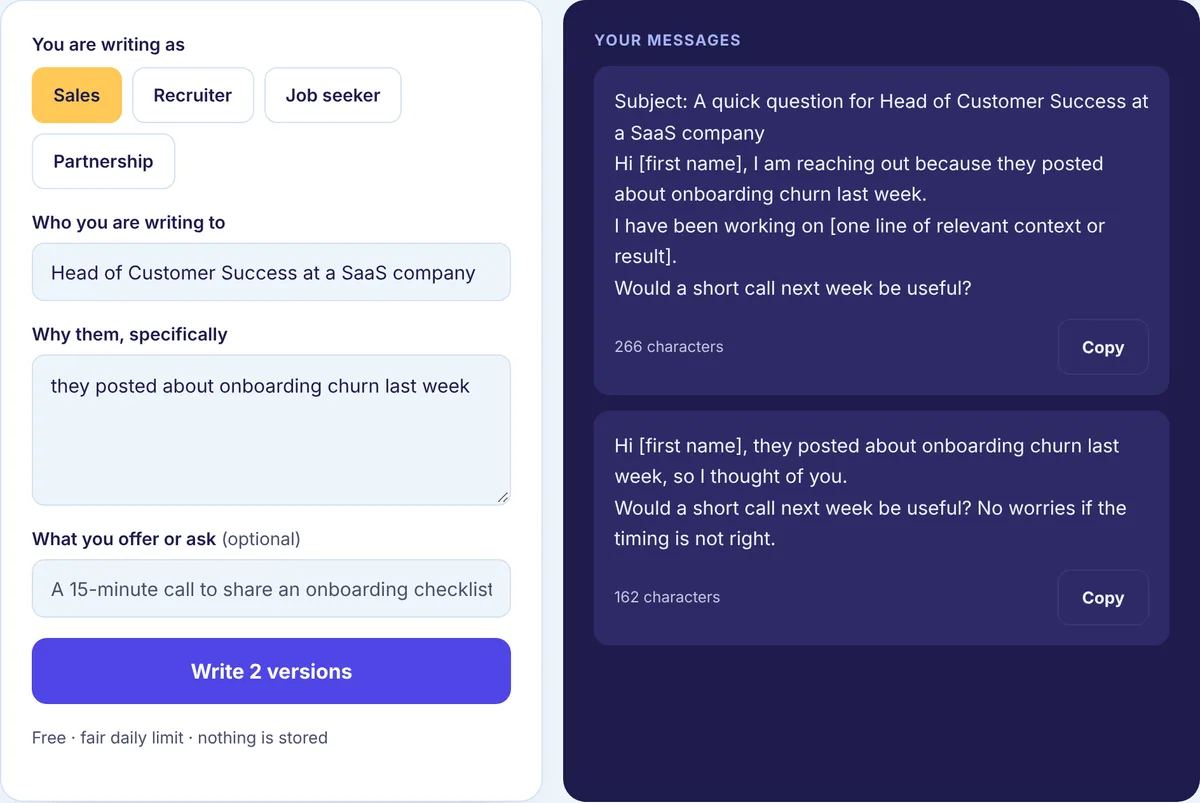
Advice like that is easy to agree with and hard to apply, so this page does something different. We take one cold message from a blank page to a finished draft, one step at a time, and show the draft at each stage. After that, the same steps produce finished messages for hiring, job seeking and partnerships. The free Cold Message and InMail Generator follows the same steps if you would rather start from a draft.
The example we will build
You run a small consultancy that sets up help centers for support teams. You want to reach Dana, who leads customer success at Northwind, a software company. Dana has never heard of you. You are connected, because she accepted a plain connection request last week, so a regular message will reach her. (If you were not connected, the same message could go out as an InMail; the InMail vs message guide explains when that is worth it.)
Here is the message most people would write first. Call it draft zero:
Hi Dana, I hope you are well! My name is Chris and I run a consultancy that helps SaaS companies build world-class help centers. We have worked with many teams and our clients love the results. I would love to set up a 30-minute call to show you how we could help Northwind. Are you free next week?
Nothing in it is false or rude. It will still probably be ignored, because Dana cannot see why she got it, it is mostly about Chris, and it asks for half an hour from a stranger. Here is how to fix it, one step at a time.
Step 1: Decide the smallest yes you want
Before writing a word, decide what a reply looks like. Not the sale, not the meeting. The first small yes. For Dana, a good one is “sure, send it over” in response to an offer of something useful.
This step changes everything after it. Once the goal is a small yes, you stop trying to fit your whole pitch into the first message.
Step 2: Find one real detail in five minutes
You do not need a dossier. You need one thing you can honestly mention. Look in this order and stop when you find something:
- Her recent posts and comments, which show what she cares about this month.
- Her headline and About section, which show how she describes her own work.
- Northwind’s news: a launch, open roles, a new office.
- Shared ground, like a mutual connection, the same past employer or the same event.
Say you find two things: Dana posted last week about new support reps taking too long to ramp up, and Northwind has three support roles open. Write the detail down as a phrase before you draft: “her post on new reps ramping slowly, plus three open support roles.” If you cannot find anything after five minutes, Dana may not be the right person yet. Comment on her posts for a few weeks and come back.
Step 3: Open with why her
The first sentence does the most work. It should make Dana think “this is about me,” not “this is about a vendor.” Personalization is not her first name; it is the detail.
Hi Dana, your post about new support reps taking months to ramp up matched what I hear from support leads a lot.
That is draft one. It is a single sentence and already more interesting than all of draft zero, because it is about her problem.
Step 4: Add one line that matters to her
Now connect your reason to something useful for her. This is where you can mention what you do, in a clause, but only as it relates to her problem.
Hi Dana, your post about new support reps taking months to ramp up matched what I hear from support leads a lot. With three support roles open at Northwind, I put together a one-page checklist of what other teams wrote down before new hires started.
Notice we did not say “we help SaaS companies build world-class help centers.” The checklist shows what you do without announcing it.
Step 5: Ask for the small yes
End with a question she can answer in one word. Not “can we book a demo?” Not three questions at once.
Hi Dana, your post about new support reps taking months to ramp up matched what I hear from support leads a lot. With three support roles open at Northwind, I put together a one-page checklist of what other teams wrote down before new hires started. Want me to send it?
That is the finished message. Three sentences, one ask, and the only thing about you is the thing that helps her.
Step 6: Cut, read aloud, check the length
Read it out loud. Anything that sounds like a brochure goes. Remove “I hope you are well” if it slipped back in. Do not attach the checklist yet; offer it, and send it when she says yes. Links and files in a first message from a stranger look suspicious, and they skip the small yes.
When we counted, draft zero came out at 298 characters and the finished message at 269. So the length barely changed. What changed is that every sentence is now about Dana, and that is the part that earns a reply. There is no perfect length, but if a cold message needs scrolling on a phone, it is too long. If you are sending it as a connection note instead of a message, there is a strict character limit, listed on our LinkedIn character limits page.
Step 7: Send it yourself, then wait
Send the message by hand. If you are writing to many people, keep the structure and swap in a real detail for each one. The Personalization Tool fills a template from a list, one message per person, and flags anyone who is missing the detail, so you can fix it before you copy and send. Do not use software that sends messages for you; LinkedIn does not allow it, and it shows in the replies you do not get.
If Dana does not reply, wait a few business days and send one short follow-up that adds something new. The guide to following up on LinkedIn has the timing and wording.
The same steps for other goals
Here is what the seven steps produce in three other situations. The smallest yes changes; the shape does not. These are examples written for this page, so swap in your own details.
Hiring
Smallest yes: agreeing to a short chat. Detail: a project they maintain.
Hi Taylor, the open-source testing library you maintain is one our team uses every week. We are hiring a senior QA engineer at Brightline, and the role would put that kind of work at the center. Open to a short chat about it?
Job seeking
Smallest yes: answering two questions. Detail: a post about how the team works.
Hi Alex, I am applying for the product analyst role on your team, and your post about how you measure activation is a big part of why. Could I ask you two quick questions about what the team values most?
For messages aimed at recruiters specifically, see how to message a recruiter on LinkedIn.
Partnerships
Smallest yes: interest in a swap. Detail: overlap in audience.
Hi Sam, your newsletter readers keep asking about onboarding, which is all we write about. Would you be open to a guest post swap next month?
Where cold messages usually go wrong
Most of the problems show up in draft zero above. A name and company dropped into a generic message is not personalization, and readers spot it instantly. Opening with flattery, like “I am so impressed by your amazing profile,” reads as a setup. Asking for a meeting in the first message asks too much of a stranger. Several questions at once make replying feel like homework. And the same text sent to a hundred people will be treated like it was sent to a hundred people.
One more: do not hide what you do. If you sell something and the person replies, say so plainly in your next message. The first message just does not need to lead with it.
Measure one change at a time
Keep a simple count each month: cold messages sent, replies, and conversations that went somewhere. When you want to improve, change one thing, such as the opening detail or the size of the ask, and compare the next month against your own numbers.
Write your cold message
Open the free Cold Message and InMail Generator, pick your goal, tell it who you are writing to and the detail you found, and edit the version you like best. For ready structures to start from, browse our cold message templates, and for the whole process from first note to follow-up, see our LinkedIn outreach guides.